What is OCR (Optical Character Recognition)?

DEFINITION
Optical Character Recognition (OCR) is technology that converts images containing text into machine-readable digital text. The technology is designed to analyze photos and files containing text to identify characters and transform them into editable, searchable text data.
What is OCR?
OCR reads text from images and turns it into digital format. Scan a paper invoice or snap a photo of a receipt and OCR extracts the text so you analyze it.
In reality, this technology works with printed text, hand notes, and even text embedded in the complex layout like tables or forms.
- OCR converts images of text into editable, searchable digital text.
- 95% error rate reduction compared to manual data entry.
- This technology can process scanned documents, photos, and PDFs in just seconds.
Key Takeaways
How OCR Works
This technology follows a multi-step process to convert images into text:
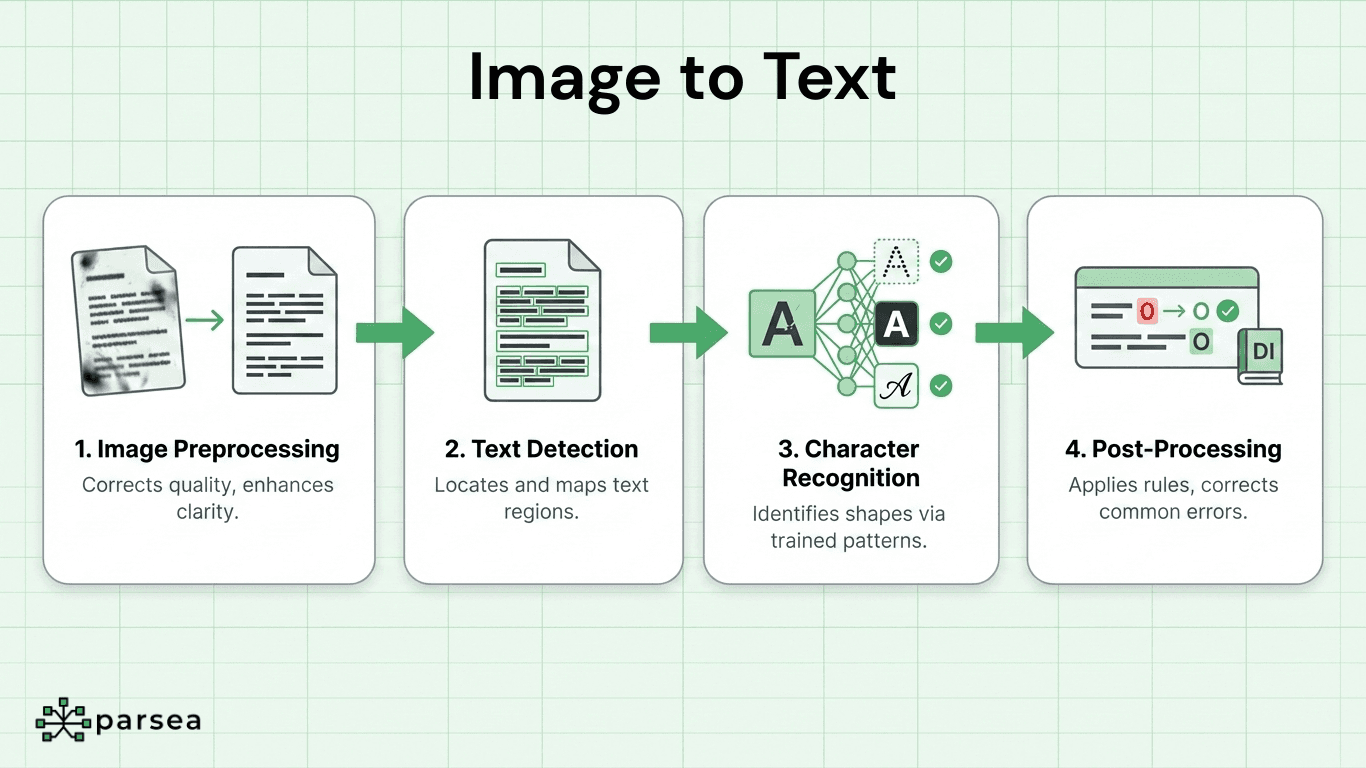
1. Image Preprocessing
First, the system improves image quality correcting skewed angles, adjusting contrast, removing noise, and enhancing clarity. This step ensures the OCR engine can accurately identify characters.
2. Text Detection
Next, OCR locates text regions within the image identifying where text appears versus graphics, white space, or other elements. The system maps text blocks, lines, and individual words.
3. Character Recognition
Here's where the real work happens. The engine checks the shape of every character and compares it against known patterns. Most OCR engines rely on neural networks that have been trained using millions of different character examples.
4. Post-Processing
Language rules and dictionaries are applied to improve accuracy. Common errors are corrected, such as validating words and the output format. In addition, post-processing fixes mistakes like confusing "O" with "0" or "l" with "1".
Advanced OCR systems also understand document structure. They recognize tables, preserve formatting, and maintain the relationship between text elements. This makes OCR particularly valuable for document processing workflows where structure matters.
OCR Use Cases
OCR technology powers countless business applications:
- Invoice Processing: Extract vendor names, amounts, dates, and line items from invoices automatically
- Receipt Scanning: Digitize expense receipts for accounting and reimbursement systems
- Form Digitization: Convert paper forms into structured database records
- Document Archiving: Make scanned historical documents searchable and accessible
- Data Entry Automation: Eliminate manual typing from paper documents into spreadsheets
- License Plate Recognition: Read vehicle plates for parking and security systems
- Identity Document Scanning: Extract traveler information at airports, border controls, or for KYC/AML purposes
Real Application: Bulk Document Processing
At Parsea, we process thousands of documents using OCR technology converting them into structured data. This data is typically imported in documents that use different format and structure, but our OCR engine achieves 96.5% accuracy and is able to find the data we need in seconds.
OCR vs. ICR
ICR (Intelligent Character Recognition) is OCR built specifically for handwriting. Traditional OCR works best with printed text, but ICR can adapt to different writing styles.
The key difference? OCR matches printed characters against fixed templates. ICR uses machine learning to recognize varied handwriting. ICR needs more processing power, but it can handle forms, notes, and signatures that standard OCR can't read.
Improving OCR Accuracy
Document quality is one of several factors to consider in determining the accuracy of OCR. In general, higher-resolution images (300 DPI or above) produce superior results compared to low-resolution scans.
Clean your documents before scanning. Remove stains, smooth wrinkles, and ensure good lighting. Contrast between text and background significantly affects recognition rates. Black text on white backgrounds works best.
Not all OCR engines are created equal. Some excel at invoices, others at forms or contracts. Ideally, you want to test multiple options to find what works for your documents.
Zonal OCR
Zonal OCR reads only specific parts of a document instead of processing the entire page. You define zones where data appears, and the system reads just those areas.
This works well for standardized forms where fields always appear in the same spot. Think invoices from a specific vendor, tax forms, or shipping labels. The technique is faster and more accurate because it ignores irrelevant content.
AI OCR
Standard OCR reads characters. AI OCR understands what those characters mean. By combining OCR with machine learning and natural language processing, AI-powered systems can classify documents, extract labeled fields, and validate data against business rules automatically.
The practical difference is significant. Traditional OCR needs a human to interpret its output. AI OCR delivers structured, ready-to-use data. It handles varied layouts without fixed templates, improves accuracy over time, and works across invoices, contracts, forms, and more.
Best Practices for Scanned Documents Digitization
Maximize OCR accuracy with these essential practices:
- Use grayscale or color scanning for better character recognition
- Align documents straight on the scanner bed to avoid skew
- Save scans as PNG or TIFF for best quality, avoid heavy JPEG compression
Proper scanning technique reduces post-processing corrections and improves workflow efficiency.
Frequently Asked Questions
What is OCR in PDF documents?
OCR converts image-based PDFs into searchable, editable text. Many PDFs contain scanned images rather than actual text. OCR analyzes these images, extracts the text, and makes the PDF searchable—essential for digitized paper documents, signed contracts, and archived files.
Can OCR read handwritten text?
Yes, but with lower accuracy than printed text. Clear handwriting can hit 85-92% accuracy. Messy handwriting? Expect 60-75% at best.
How accurate is OCR technology?
OCR accuracy depends on document quality and text complexity. Clean, high-resolution digital documents achieve 98-99% accuracy. Standard scanned documents at 300 DPI reach 95-97% accuracy, while low-quality scans or damaged documents may only achieve 75-85%. Key factors include image resolution, text size, font type, and document condition.
Final Thoughts
OCR changes how businesses handle documents eliminating manual data entry, reducing errors, increasing efficiency, and making information instantly searchable. Whether you're processing invoices, digitizing archives, or automating forms, OCR delivers value fast.
The technology is a foundational component of modern document processing systems. Combined with machine learning and workflow automation, it enables organizations to process thousands of documents daily with minimal human intervention.