Screen to Spreadsheet in Seconds
Extract tables from any webpage, PDF, or image. Convert visible data into structured spreadsheets instantly. Free, no signup required.
Works on Chrome, Edge, and any other Chromium-based browser.
Powerful Features
Everything you need to extract and export table data from the web.
Any Table, Any Format
Extract data from websites, local files, and PDF documents displayed in your browser.
Instant Export
Copy extracted tables to clipboard, download as CSV/Excel, or email results directly.
Auto Capture
Automatically detect and extract all tables on a page with a single click.
Manual Selection
Draw a selection box around any visible table for precise extraction control.
Works Everywhere
Extract from JavaScript-rendered sites, dashboards, and dynamic web apps.
Free to Use
No signup required. No subscription. Just install and start extracting data.
How It Works
Extract tables in four simple steps.
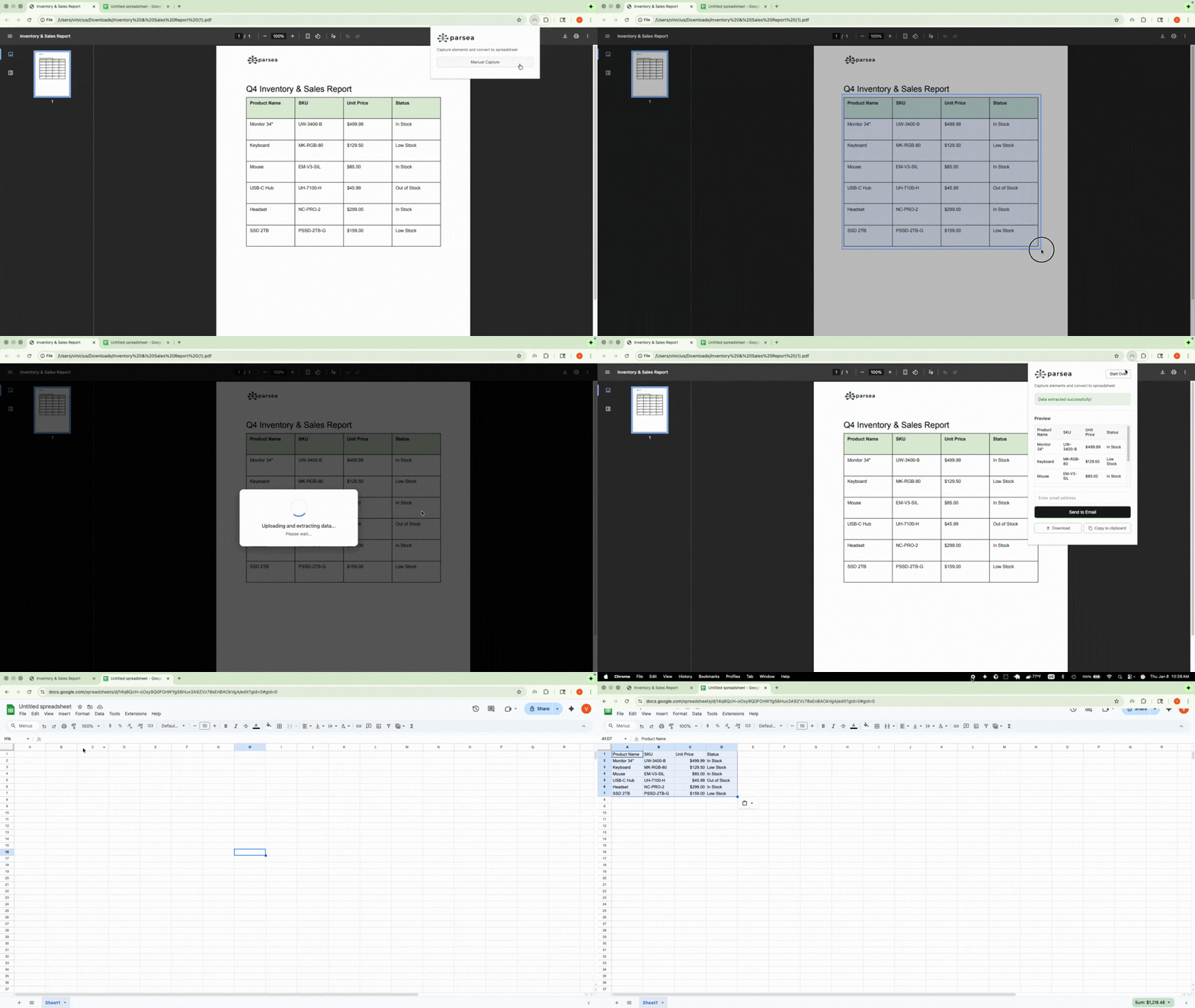
Open the Extension
Click the Parsea icon on any page or file containing a table.
Choose Capture Mode
Use Auto Capture for automatic detection or Manual for precise selection.
Select Your Table
The extension highlights detected tables. Click to select.
Export Your Data
Preview results and export instantly via copy, download, or email.
Perfect For
Data Analysts
Extract tables from dashboards, reports, and web apps for analysis in Excel or Google Sheets.
Professionals
Quickly capture data from any website. Use it for your business or personal projects.
Researchers
Gather data from academic papers, government sites, and online databases efficiently.

Start Extracting Data Today
Join our growing community of users who save hours every week with Parsea. No signup required.
Frequently Asked Questions
Is the extension really free?
Yes, Parsea is completely free to use. No subscriptions, no hidden fees, no credit card required.
What browsers are supported?
Parsea works on Chrome, Microsoft Edge, Brave, and any other Chromium-based browser.
Does it work with JavaScript-rendered sites?
Yes! Unlike traditional web scraping tools, Parsea captures what you see on screen, so it works with React, Vue, Angular, and any other framework.
Is my data secure?
Your data stays on your device. We do not store or transmit your extracted data to any servers. See our privacy policy for details.