What is AI OCR? How It Works and Why It Matters

AI OCR (Artificial Intelligence Optical Character Recognition) is an upgrade to traditional text recognition technology. Instead of just reading characters from an image, it uses machine learning and natural language processing to understand what that text means. It classifies documents, identifies relevant fields, and extracts the right data even from complex or inconsistent layouts. If you're dealing with invoices, contracts, or any volume of documents, AI OCR is the engine that makes automation possible.
- AI OCR reads text and understands what it means, not just what it says.
- It handles complex layouts, handwriting, and varied document formats.
- It is the core technology powering intelligent document processing (IDP) workflows.
Key Takeaways
What is AI OCR?
Traditional optical character recognition (OCR) does one thing well: it converts images of text into machine-readable characters. It looks at a scanned invoice and turns the pixels into letters and numbers. That's genuinely useful. But it stops there.
AI OCR takes that same process and adds a layer of understanding on top. It knows that the number near "Total Due" is the amount owed, not just another digit on the page. It can distinguish between a billing address and a shipping address even when both appear on the same document. It gets more accurate every time it processes a new file.
This is why AI OCR has become closely linked with intelligent document processing (IDP): a broader approach to automating document workflows from capture all the way through to integration with your business systems.
How AI OCR Works
The process is pretty straightforward, moving from a raw file to structured data in a few steps:
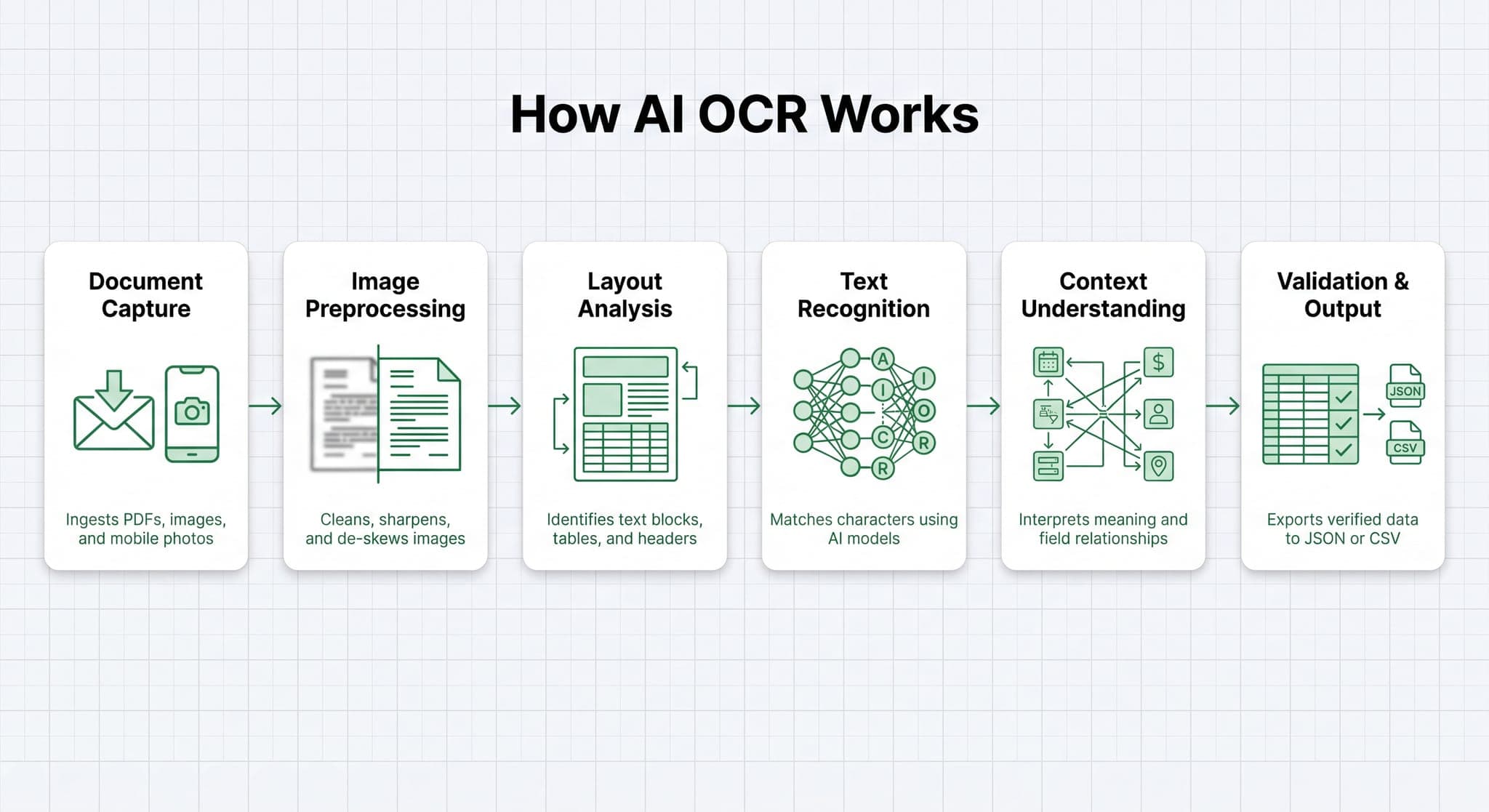
1. Document Capture
Documents enter the system from email attachments, web uploads, scanners, or direct API connections. The system accepts PDFs, images, scanned files, and photos taken on a phone. Whatever format the document arrives in, it gets ingested here.
2. Image Preprocessing
The system automatically fixes crooked scans, adjusts the contrast, and sharpens the edges so the text is easier to read.
3. Layout Analysis
The system builds a structural map of the document. It identifies text blocks, tables, headers, checkboxes, and signatures. This step preserves the logical layout so the extraction stage knows where each piece of data belongs.
4. Text Recognition and Pattern Recognition
This is where the actual reading happens. The OCR engine analyzes the shape of each character and matches it against known patterns, a technique called pattern recognition. Imagine a vast library of every possible version of the letter "A" across every font that has ever existed. The engine compares what it sees against that library and finds the closest match.
AI-powered systems go further with neural networks trained on millions of character examples. This gives them the ability to handle unusual fonts, degraded scans, and even handwritten text with far greater accuracy than rule-based approaches.
5. Context Understanding
Natural language processing (NLP) interprets what the recognized text means in context. The system can determine that "Bill" next to a dollar amount refers to an invoice, not a person's name. It understands field relationships, document structure, and semantic meaning in a way that simple character recognition never could.
6. Validation and Output
Extracted data is checked against business rules. Do the line items add up to the total? Is the date format valid? Does the vendor name match a known supplier? Documents that pass get exported as JSON, CSV, or other formats and pushed into downstream systems. Documents that fail go to a human review queue.
Why Continuous Learning Matters
Every time a human corrects an AI OCR extraction, the model learns from it. A system that processed 10,000 invoices last month is more accurate this month than it was at the start. This compounding improvement is one of the biggest advantages AI OCR has over traditional rule-based recognition.
AI OCR vs. Traditional OCR
The gap between the two comes down to understanding. Traditional OCR gives you raw text. AI OCR gives you structured, labeled, meaningful data.
| Traditional OCR | AI OCR | |
|---|---|---|
| What it does | Converts image text into characters | Reads, classifies, and extracts structured data |
| Context awareness | None | Understands meaning and relationships |
| Handles varied layouts | Needs fixed templates | Adapts to new formats automatically |
| Improves over time | No | Yes, through continuous learning |
| Handwriting support | Limited | Strong, using ICR technology |
For businesses processing large volumes of document data extraction tasks, the difference is significant. Traditional OCR requires a human to interpret the output. AI OCR delivers data that's ready to use.
What is intelligent document processing (IDP)?
Intelligent document processing is the end-to-end workflow that AI OCR powers. IDP covers capturing documents, classifying them by type, extracting relevant data, validating it against business rules, and routing it to the right system. AI OCR is the engine inside IDP that handles reading and understanding document content. Together they form the backbone of modern document processing automation.
How accurate is AI OCR compared to traditional OCR?
Traditional OCR on clean, high-resolution documents can reach 95-99% character accuracy. But on complex forms, varied layouts, or handwritten content, accuracy drops significantly. AI OCR maintains high accuracy across these harder cases and improves further over time through learning. For mixed-quality document batches in real-world workflows, AI OCR consistently outperforms rule-based approaches.
What types of documents can AI OCR handle?
AI OCR handles a wide range: invoices, receipts, contracts, bank statements, tax forms, ID documents, medical records, purchase orders, and more. It works with PDFs, scanned images, mobile photos, and complex multi-page files. The key advantage is that it doesn't require a fixed template for each document type, so new formats don't require manual configuration.
Final Thoughts
AI OCR closes the gap between reading a document and understanding it. Traditional OCR gives you characters. AI OCR gives you data you can actually use. For any team dealing with invoices, forms, contracts, or large volumes of files, that distinction determines whether automation is possible at all.
The technology works best as part of a broader intelligent document processing pipeline, where capture, classification, extraction, validation, and integration all connect. Want to see how extraction fits into that picture? Our document data extraction guide breaks down each capability and shows how to apply them to real workflows.